Page 1 of 2
VIRTUAL DJ-NEED HELP!
Posted: Mon May 03, 2010 2:31 am
by DubSac
hey- i just got virtual dj to start recording sum mixes- im kinda having trouble beatmatching... right now im just listening by ear and queing the next track to try and make it fit. any suggestions??
also- how do i go about mixing songs with different tempos- if i synch a sng with 150 bpm to 140 or vice versa-it sonds bad
THANKS ALL!
Re: VIRTUAL DJ-NEED HELP!
Posted: Mon May 03, 2010 2:44 am
by tripaddict
you should read the manual lol

use the beat mapping editor its @ the top of each deck (the bpm icon)
Re: VIRTUAL DJ-NEED HELP!
Posted: Mon May 03, 2010 3:08 am
by DubSac
i never new it had a manual!
Re: VIRTUAL DJ-NEED HELP!
Posted: Mon May 03, 2010 3:26 am
by tripaddict
DubSac wrote:i never new it had a manual!
haha probably got a pdf but i was being sarcastic lol
Re: VIRTUAL DJ-NEED HELP!
Posted: Mon May 03, 2010 10:55 am
by Brisance
WTF you cannot beatmatch with virtual dj!?
Re: VIRTUAL DJ-NEED HELP!
Posted: Mon May 03, 2010 11:04 am
by Bazzle09
Brisance wrote:WTF you cannot beatmatch with virtual dj!?
Very much this. ^^
play song 1
cue song 2
sync song 2
drop song 2
fade to song 2
cue song 3
ect.
Re: VIRTUAL DJ-NEED HELP!
Posted: Mon May 03, 2010 11:11 am
by Bazzle09
tripaddict wrote:
use the beat mapping editor its @ the top of each deck (the bpm icon)
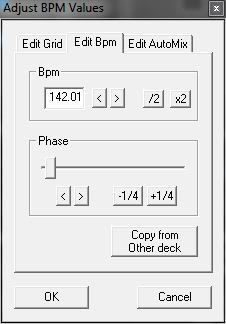
Use the slider and nudge arrows to get your downbeat in the right place (It finds it ok 9/10 times on its own), and it never hurts to have more than 1 cue point on a track. (the 1,2 and 3 buttons under the platter)
If it analyses at 70 bpm, just hit the x2 button.
Re: VIRTUAL DJ-NEED HELP!
Posted: Mon May 03, 2010 1:15 pm
by DubSac
Bazzle09 wrote:tripaddict wrote:
use the beat mapping editor its @ the top of each deck (the bpm icon)
Use the slider and nudge arrows to get your downbeat in the right place (It finds it ok 9/10 times on its own), and it never hurts to have more than 1 cue point on a track. (the 1,2 and 3 buttons under the platter)
If it analyses at 70 bpm, just hit the x2 button.
If I'm using the studio mix skin- how do i get to this little area? also i still dont really get how this matches up the beats?
Sorry if im asking stupid questions!
Re: VIRTUAL DJ-NEED HELP!
Posted: Mon May 03, 2010 1:17 pm
by Brisance
Re: VIRTUAL DJ-NEED HELP!
Posted: Mon May 03, 2010 1:28 pm
by Bazzle09
Not sure about the skin dude, most ppl use the Internal mixer skin iirc, but as said before it should be right at the top, "Bpm" button, there's one for each deck.
When you drag a track in that VDJ hasn't seen before, it will analyse it and make a file somewhere so it don't have to analyse it again. The Bpm button gives you some advanced tweaking options.
What you want to be looking at is the waveform at the top, underneath that there are squares that follow the beat, the big one goes on the first bassdrum in the bar (the downbeat).
If it hasn't analysed it correctly, then just tweak it like i said before.
Also if you have a midi controller, you can set up anything to just about anything. Check out Config > Remote control > General MIDI.
I have the old oxygen 8, i have mapped the 8 knobs to eq's and faders, then data slider is a crossfader.
I rate VDJ, gets alot of grief tho as it is pretty shite compared to the pro packages. Keep at it tho.
Re: VIRTUAL DJ-NEED HELP!
Posted: Mon May 03, 2010 1:36 pm
by Bazzle09
Brisance wrote:
My Documents > Virtual DJ > VirtualDJ - User Guide.pdf

Re: VIRTUAL DJ-NEED HELP!
Posted: Mon May 03, 2010 2:12 pm
by tripaddict
Brisance wrote:WTF you cannot beatmatch with virtual dj!?
with a controller i beg to differ ;0)
Re: VIRTUAL DJ-NEED HELP!
Posted: Mon May 03, 2010 2:22 pm
by kontrol
yea you can, use the internal mixer skin silly
Re: VIRTUAL DJ-NEED HELP!
Posted: Mon May 03, 2010 8:48 pm
by DubSac
all right il try that... any suggestions on where to que tracks? right now im just letting one play, an at the end trying to que in the very begining of the next
Re: VIRTUAL DJ-NEED HELP!
Posted: Mon May 03, 2010 8:51 pm
by impey
Press sync next to the play button to match the BPM?..
Re: VIRTUAL DJ-NEED HELP!
Posted: Mon May 03, 2010 8:53 pm
by DubSac
i did that- that synchs the bpm- but im still having trouble knowing when to press play and start the second track
Re: VIRTUAL DJ-NEED HELP!
Posted: Mon May 03, 2010 8:57 pm
by impey
When its the start of a new 4 bars? or just before a breakdown or build-up
Re: VIRTUAL DJ-NEED HELP!
Posted: Mon May 03, 2010 9:02 pm
by DubSac
yea- thats what im doing now- but is there any way i can tell if i beatmatched it right b4 i fade it in?
right now, i press play when i think its beatmatched right- then fade it in- but alot of the times its off- any way i can notice? this b4 i fade it in?
Re: VIRTUAL DJ-NEED HELP!
Posted: Mon May 03, 2010 9:11 pm
by impey
Join the little squares up below the soundwave, Also if you have a usb soundcard you can plug headphones into it, configure it in the config area then you can cue via the headphones.
Re: VIRTUAL DJ-NEED HELP!
Posted: Mon May 03, 2010 11:52 pm
by DubSac
thanks man! just figured out the lining of the squares up!
thanks every1!