Ableton and Virus TI automation question
Forum rules
By using this "Production" sub-forum, you acknowledge that you have read, understood and agreed with our terms of use for this site. Click HERE to read them. If you do not agree to our terms of use, you must exit this site immediately. We do not accept any responsibility for the content, submissions, information or links contained herein. Users posting content here, do so completely at their own risk.
Quick Link to Feedback Forum
By using this "Production" sub-forum, you acknowledge that you have read, understood and agreed with our terms of use for this site. Click HERE to read them. If you do not agree to our terms of use, you must exit this site immediately. We do not accept any responsibility for the content, submissions, information or links contained herein. Users posting content here, do so completely at their own risk.
Quick Link to Feedback Forum
-
InfectedGrime
- Posts: 13
- Joined: Sat Oct 02, 2010 2:58 am
Ableton and Virus TI automation question
So I recently just bought ableton and have been having trouble automating wobbles with it. When drawing it in i just get random values in the automation lane that are 32 or some random number that represents a 1/4 or something on the virus and the values don't go in any sequence on the virus that makes sense. I was wondering what people are doing with the virus for wobble automation because there has to be something that makes more sense. Lets say you want one note to wobble at different rates, are you just drawing one long midi note and then drawing the different value in the automation lane or are you drawing different midi notes in? Maybe just having different speed wobbles on the other channels and drawing those in to work around this? Any insight would be appreciated. Thanks.
-
Sinus Sawtooth
- Posts: 475
- Joined: Thu Jun 25, 2009 9:34 am
- Location: RoffaStraatPiraat
Re: Ableton and Virus TI automation question
Are you drawing the automation in the "Clip view" modulation or in the "Session view" automation? Big difference, modulation is modulated, so it has a max range, if your Virus range is let's say 500, and you set the start range at 0, the max modulation range (100%) is I believe 127, dunno if my explanation makes sense or is 100% accurate but thats how I interpreted it, anyways, the automation lane gives you the full range.
I don't own a Virus ( ) so I don't know if it's a Virus specific problem or something else.
I don't own a Virus (
) so I don't know if it's a Virus specific problem or something else.-
MARCHMELLOW

- Posts: 979
- Joined: Tue May 08, 2007 9:33 pm
- Location: brighton-uk
- Contact:
Re: Ableton and Virus TI automation question
I Have a virusTI and ableton - to my knowledge you can't automate the LFO rate when its synced. your seeing a value or number(0-127 or summin) instead of a division (1/4) because it isn't synced.
to be honest i haven't looked into this issue since i started using ableton, i know it was the case with cubase when i used it...
but yeah i agree with Sinus - make sure you are automating in the session view, not the clip view.
to be honest i haven't looked into this issue since i started using ableton, i know it was the case with cubase when i used it...
but yeah i agree with Sinus - make sure you are automating in the session view, not the clip view.
www.soundcloud.com/marchmellowuk
Dub & Run Records/Phreaks of Nature/Wicky Lindows/BassPunch Records/Tsunami Audio/ Love Sick Records.
Dub & Run Records/Phreaks of Nature/Wicky Lindows/BassPunch Records/Tsunami Audio/ Love Sick Records.
-
InfectedGrime
- Posts: 13
- Joined: Sat Oct 02, 2010 2:58 am
Re: Ableton and Virus TI automation question
Sorry, I'm a super noob with ableton. The session view is the time line one, not the one with the loops and what not right?
From what I've been experiencing it seems like it would be easier to record audio of different rate wobbles and chop them and arrange them that way... which really isn't too integrated if you ask me. I love the virus and bought ableton because I hate midi in protools but this seems to set me further behind then what I was doing in protools.
From what I've been experiencing it seems like it would be easier to record audio of different rate wobbles and chop them and arrange them that way... which really isn't too integrated if you ask me. I love the virus and bought ableton because I hate midi in protools but this seems to set me further behind then what I was doing in protools.

Re: Ableton and Virus TI automation question
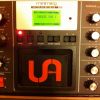
turn the sync off on the virus.. your wobbles will still happen in timeMARCHMELLOW wrote:you can't automate the LFO rate when its synced.
Re: Ableton and Virus TI automation question
Yes you canMARCHMELLOW wrote:you can't automate the LFO rate when its synced.
Happened in the version 3 software update in 2009
automate lfo clock
SEVEN - MORNING LIGHT Ft. ALYS BE (CHEWIE REMIX)
Soundcloud
https://www.facebook.com/chewiedubstep
http://soundcloud.com/chewie
https://www.facebook.com/UpriseAudio
Soundcloud
https://www.facebook.com/chewiedubstep
http://soundcloud.com/chewie
https://www.facebook.com/UpriseAudio
Re: Ableton and Virus TI automation question
HAH!!chewie wrote:Yes you canMARCHMELLOW wrote:you can't automate the LFO rate when its synced.
Happened in the version 3 software update in 2009
automate lfo clock
I was wondering why you cannot right click "add parameter to automation" when it's synced
now I know where to right click
Chewie, you are a don!
Re: Ableton and Virus TI automation question
Np UnkleFSTZ wrote: HAH!!
I was wondering why you cannot right click "add parameter to automation" when it's synced
now I know where to right click
Chewie, you are a don!

SEVEN - MORNING LIGHT Ft. ALYS BE (CHEWIE REMIX)
Soundcloud
https://www.facebook.com/chewiedubstep
http://soundcloud.com/chewie
https://www.facebook.com/UpriseAudio
Soundcloud
https://www.facebook.com/chewiedubstep
http://soundcloud.com/chewie
https://www.facebook.com/UpriseAudio
Who is online
Users browsing this forum: No registered users and 0 guests