I hate that when you have a track in "read" mode and you have volume automation on that track, that you can no longer use the track's fader to globally affect the automation i.e. if I want to raise the volume +1db across the board, but keep the automation as is, I have to select all the animation and raise it up...not exactly a rough task, but it sucks during mixing.
So I realized that if you just put a gain plugin at the end of the effect chain, you can automate the volume that way, leaving the "master fader" for that track available to adjust as you please.
Jst thought I'd share, I think this is going to help me a lot.
Logic Volume Automation Trick
Forum rules
By using this "Production" sub-forum, you acknowledge that you have read, understood and agreed with our terms of use for this site. Click HERE to read them. If you do not agree to our terms of use, you must exit this site immediately. We do not accept any responsibility for the content, submissions, information or links contained herein. Users posting content here, do so completely at their own risk.
Quick Link to Feedback Forum
By using this "Production" sub-forum, you acknowledge that you have read, understood and agreed with our terms of use for this site. Click HERE to read them. If you do not agree to our terms of use, you must exit this site immediately. We do not accept any responsibility for the content, submissions, information or links contained herein. Users posting content here, do so completely at their own risk.
Quick Link to Feedback Forum
-
judge_banks
- Posts: 53
- Joined: Mon Aug 09, 2010 1:37 am
- Location: Detroit, MI
-
lyons238

- Permanent Vacation
- Posts: 1725
- Joined: Tue May 04, 2010 12:04 am
- Location: USA - Providence, RI
Re: Logic Volume Automation Trick
yeah most people automate the volume on the synth instead of the mixer channel at least until they're totally done mixing...it is a pain in the ass have automation set on a mixer fader then needing to change the original position of the fader.

-
Manic Harmonic

- Posts: 505
- Joined: Tue Apr 19, 2011 11:37 pm
Re: Logic Volume Automation Trick
If you hold down option and drag the little yellow volume fader in the arrange window, you can adjust the entire volume of the track. Hope that makes sense
Last edited by Manic Harmonic on Fri Aug 19, 2011 3:27 pm, edited 1 time in total.
-
RandoRando

- Posts: 3042
- Joined: Fri Jan 07, 2011 10:26 am
- Location: CA, United States of America
Re: Logic Volume Automation Trick
idk about logic, but in FL to automate volumes i just put a "fruity balance" (which is basically just a volume knob" on the end of signal chain of the mixer track, turn the balance down to what the volume to be when it gets automated, then i just adjust the wet/dry 0% to 100% of the balance when i want the volume to be automated.

Please like my facebook here if you like my tunes!
New Track!! Getter - Fallout (RandoRando Remix)
Soundcloud
"WAR"
Soundcloud
-
Manic Harmonic
- Posts: 505
- Joined: Tue Apr 19, 2011 11:37 pm
Re: Logic Volume Automation Trick
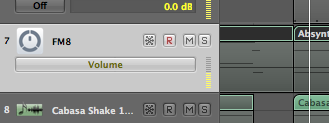
Here's what I was talking about... The yellow bar next to that automation. hold down the OPT key and drag it.

Re: Logic Volume Automation Trick
That's quality, had no idea.Manic Harmonic wrote:
Here's what I was talking about... The yellow bar next to that automation. hold down the OPT key and drag it.
Tearing black holes into clinically spatial grooves.
http://www.soundcloud.com/percept
http://www.facebook.com/perceptdubstep
http://www.twitter.com/perceptUK
perceptmusicUK@aol.co.uk
http://www.soundcloud.com/percept
http://www.facebook.com/perceptdubstep
http://www.twitter.com/perceptUK
perceptmusicUK@aol.co.uk
-
judge_banks
- Posts: 53
- Joined: Mon Aug 09, 2010 1:37 am
- Location: Detroit, MI
Re: Logic Volume Automation Trick
PERCEPT wrote:That's quality, had no idea.Manic Harmonic wrote:
Here's what I was talking about... The yellow bar next to that automation. hold down the OPT key and drag it.
Yeah, I gotcha, but it's still inconvenient to have to open up the automation lane and use the mouse, as opposed to simply bumping up a fader on my control surface.
-
Manic Harmonic
- Posts: 505
- Joined: Tue Apr 19, 2011 11:37 pm
Re: Logic Volume Automation Trick
yeah for sure. i think im gonna try this technique from now on...judge_banks wrote:PERCEPT wrote:That's quality, had no idea.Manic Harmonic wrote:
Here's what I was talking about... The yellow bar next to that automation. hold down the OPT key and drag it.
Yeah, I gotcha, but it's still inconvenient to have to open up the automation lane and use the mouse, as opposed to simply bumping up a fader on my control surface.

Re: Logic Volume Automation Trick
I found the gain plugin doesnt really automate smoothly. Try it yourself, put a simple straight curve in and watch its fader. I prefer sending the sound to its own bus, then put that bus under the synth/sampler whatever in the arrange window and you then have one extra fader to make small adjustments

Re: Logic Volume Automation Trick
Works fine for me. theres a 'Sample Accurate Automation' option in the settings. Have you got it checked?Depone wrote:I found the gain plugin doesnt really automate smoothly. Try it yourself, put a simple straight curve in and watch its fader. I prefer sending the sound to its own bus, then put that bus under the synth/sampler whatever in the arrange window and you then have one extra fader to make small adjustments

Re: Logic Volume Automation Trick
sonalksis free-G
twitter.com/sharmabeats
twitter.com/SubSwara
subswara.com
myspace.com/davesharma
Low Motion Records, Soul Motive, TKG, Daly City, Mercury UK
twitter.com/SubSwara
subswara.com
myspace.com/davesharma
Low Motion Records, Soul Motive, TKG, Daly City, Mercury UK
Re: Logic Volume Automation Trick
no shit...Manic Harmonic wrote:If you hold down option and drag the little yellow volume fader in the arrange window, you can adjust the entire volume of the track. Hope that makes sense
thats boosted
Sharmaji wrote:2011: the year of the calloused-from-overuse facepalm
-
Manic Harmonic
- Posts: 505
- Joined: Tue Apr 19, 2011 11:37 pm
Re: Logic Volume Automation Trick
i dont know what you mean, its not boosted if your track is well below 0 db... its just changing the overall volume of your automation, right?. i dont know why youre saying no shit, because apparently a few people didnt know it...Ldizzy wrote:no shit...Manic Harmonic wrote:If you hold down option and drag the little yellow volume fader in the arrange window, you can adjust the entire volume of the track. Hope that makes sense
thats boosted
Re: Logic Volume Automation Trick
lol sorry, i meant boosted as in ... nvm...
i just meant, thats a heck of a good tip
i just meant, thats a heck of a good tip
Sharmaji wrote:2011: the year of the calloused-from-overuse facepalm

Re: Logic Volume Automation Trick
am i reading this wrong or are we saying that this allows you to adjust volume automation all at once for a track? so if i've got a track's volume automating from -6 db to -8 db and i adjust this with opt + click by -2 db, it'll bring all of that down by 2 db? or am i an idiot and this is about something else? cause i quickly tried it on a track just now and wasn't seeing any adjustments on track automation but, again, i may be an idiot.
Re: Logic Volume Automation Trick
Yea. Had a go last night and it does exactly thisambinate wrote:am i reading this wrong or are we saying that this allows you to adjust volume automation all at once for a track? so if i've got a track's volume automating from -6 db to -8 db and i adjust this with opt + click by -2 db, it'll bring all of that down by 2 db? or am i an idiot and this is about something else? cause i quickly tried it on a track just now and wasn't seeing any adjustments on track automation but, again, i may be an idiot.
-
Manic Harmonic
- Posts: 505
- Joined: Tue Apr 19, 2011 11:37 pm
Re: Logic Volume Automation Trick
oh ok. i was hella confused. fuck yeahLdizzy wrote:lol sorry, i meant boosted as in ... nvm...
i just meant, thats a heck of a good tip
Re: Logic Volume Automation Trick
never forget im french canadian people...
Sharmaji wrote:2011: the year of the calloused-from-overuse facepalm
Re: Logic Volume Automation Trick
hmm, not sure why it wasn't working for me. i'll have to try it out again later. would be a big time saver.
-
Manic Harmonic
- Posts: 505
- Joined: Tue Apr 19, 2011 11:37 pm
Re: Logic Volume Automation Trick
I think I accidentally said command key, its actually option. did you try both?ambinate wrote:hmm, not sure why it wasn't working for me. i'll have to try it out again later. would be a big time saver.
Who is online
Users browsing this forum: No registered users and 0 guests