Page 1 of 1
Stumped by Asio4ALL driver since install? Sound is terrible.
Posted: Sun Sep 25, 2011 7:32 am
by FruitFlesh
Hey guys, I was wondering if anyone else has come across this? Maybe it happens on other DAWs?
I installed Asio4ALL v2 the other day when trying to hook up my piano via midi to my laptop. I finally got it working but at a cost...
If I have Ableton open, I can't play anything through the internet at all.
Other things like Windows Media Player for instance says it encounters a problem trying to playback. Itunes won't work either. This happens when I have live open.

When I do close live, playing music & media on the internet like soundcloud and youtube is now glitchy too, just doesn't sound right/smooth like it should.
Basically everything is now glitchy
despite turning up the buffer size to maximum - I can't turn it up anymore.
Please help me ='[ I was so happy I got my piano all connected the other day and now this is happening. I have been trying to fix it all day yesterday so I didn't have to bother anyone.
I'll include a screenshot so you see what I mean:
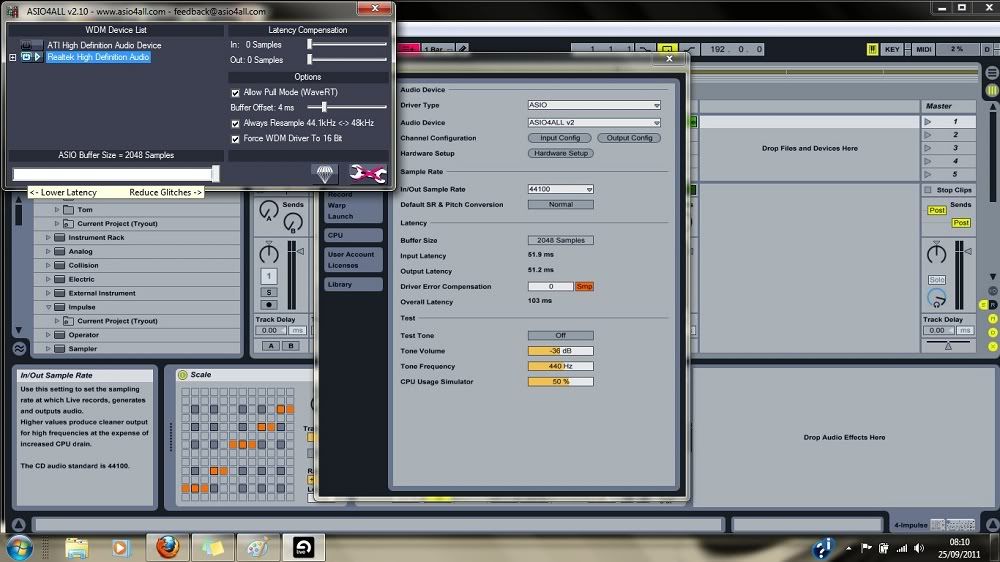
Don't know what else to do anymore
Thanks in advance x
Re: Stumped by Asio4ALL driver since install? Sound is terri
Posted: Sun Sep 25, 2011 7:40 am
by RandoRando
1: look for an "auto close device" option in ableton. That's what it's called in FL . Which means when ableton is minimized it will free up your soundcard for other programs.
Or 2: deal w it. Lol. Not to b a dick. Spend more time in ableton then on the webs!
Re: Stumped by Asio4ALL driver since install? Sound is terri
Posted: Sun Sep 25, 2011 7:51 am
by RandoRando
Didn't read you were getting crackles. Yeah turn te buffer up to the point where u aren't crackling anymore. If it still crackles at max buffer. A new and better soundcard, preferably an interface will solve that. What's your pc specs?
Re: Stumped by Asio4ALL driver since install? Sound is terri
Posted: Sun Sep 25, 2011 7:56 am
by RandoRando
Wait so even when live is completely closed other audio from iTunes an internet is laggy?
Re: Stumped by Asio4ALL driver since install? Sound is terri
Posted: Sun Sep 25, 2011 8:05 am
by FruitFlesh
Errrm my laptop specs: AMD Turion II P540 Dual Core Processor, 2.40 GHz. 4.00 Gb. 64-bit operating system.
RandoRando wrote:Wait so even when live is completely closed other audio from iTunes an internet is laggy?
Yup. Turned up to max. I just want to toggle between other tracks, A/Bing for comparisons :/
Re: Stumped by Asio4ALL driver since install? Sound is terri
Posted: Sun Sep 25, 2011 8:16 am
by RandoRando
Hmmm I jab 4 gigs of ram also and I'm fine for the most part. Did your keyboard work b4 asio?
Re: Stumped by Asio4ALL driver since install? Sound is terri
Posted: Sun Sep 25, 2011 8:23 am
by FruitFlesh
Yes, kind of. Using my standard driver - it had massive latency that I couldn't comphensate in adjusting the delay. And the sound during playback was much much worse than it is now. So I installed Asio4all...
The latency on the piano went. But to put it bluntly, everything else went tits up!
Sound is worse across all other media or just won't play at all.
Re: Stumped by Asio4ALL driver since install? Sound is terri
Posted: Sun Sep 25, 2011 8:55 am
by Sine69
Asio is an asshole, but there's no alternative on Windows unfortunately. If I ever have Live open and I want to listen to someting on iTunes or whatever, I just hit the CPU meter. It disables the audio engine.
Not sure if that answers your question but I'm too tired to read the OP

Re: Stumped by Asio4ALL driver since install? Sound is terri
Posted: Sun Sep 25, 2011 9:40 am
by komanderkin
what happens when you tick off Always Resample and that Allow Pull Mode thingy? same goes for Force WDM to 16bit, have you tried switching that off?
also, what happens if you select that ATI interface instead of the Realtek one?
what's weird though is ASIO4ALL should pretty much only be engaged when you open a specific app that uses it (Live in your case). it's pretty strange that it's causing problems in your system.
Re: Stumped by Asio4ALL driver since install? Sound is terri
Posted: Sun Sep 25, 2011 10:15 am
by FruitFlesh
Allow Pull Mode and
Force WDM to 16bit don't really do anything. Maybe in my head but maybe
Force WDM to 16 bit makes the slightest difference. Wishful thinking more like.
Always Resample - I have worked out I should always leave on, found that in another forum. Unticking it stops all noise.
ATI interface - I played around with that one yesterday. The results were horrible and crackly and much worse than what I had to begin with.
All in all it sounds like I need to get a new driver? (Question: which/where?) Sorry Rando I don't know what an interface is
Um, up until 2 days ago all this would have been alien to me. But I am trying to learn very quickly to make up for it. (I really wish I got into producing sooner)
Um, it's just that the only thing Asio4all is good for is recording my piano work without delay. I think I'll just have to keep switching between duplex and asio to do any work.
Other than that I still have glitches everywhere though. :/
Thanks for the tip in hitting the CPU meter. At least I don't have to keep closing live when I need to listen to someone elses track for comparisons.
Re: Stumped by Asio4ALL driver since install? Sound is terri
Posted: Sun Sep 25, 2011 10:18 am
by FruitFlesh
komanderkin wrote:what's weird though is ASIO4ALL should pretty much only be engaged when you open a specific app that uses it (Live in your case). it's pretty strange that it's causing problems in your system.
I don't think it is handling several apps very well at all. itunes wont play my music
Re: Stumped by Asio4ALL driver since install? Sound is terri
Posted: Sun Sep 25, 2011 11:59 am
by RandoRando
check out the Focusrite Saffire 6.
its a great audio interface, an interface is an external usb soundcard, with inputs for mics and such, and also outputs for studio monitors and external hardware fx units. Keep in mind though with one youll need monitors or headphones. and go into your control panel and make sure you didnt enable asio as your main sound ouput (idk if thats even possible? ) lol .
Re: Stumped by Asio4ALL driver since install? Sound is terri
Posted: Sun Sep 25, 2011 1:02 pm
by FruitFlesh
Ooo thank you Rando. Okay I am going to bookmark this thread and read it again when I get it lol
Thanks again
